Pixel Tracking Versus Click Tracking Explained
A campaign can show strong click volume, cheap CPCs, and plenty of platform-reported conversions while still losing money. That is why pixel tracking versus click tracking is not a technical side question. It determines which parts of the customer journey you can actually see, which numbers you can bet budget on, and where your reporting can mislead you.
Pixels and click trackers solve different measurement problems. Treat either one as a complete attribution system and you will eventually make bad calls: winners get switched off, losers get more budget, and nobody can explain why the dashboards disagree.
Pixel Tracking Versus Click Tracking: The Core Difference
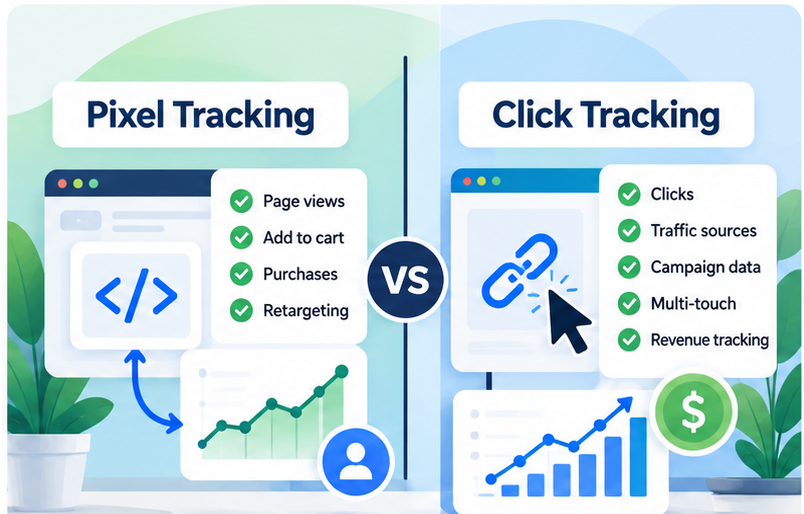
Click tracking records the moment someone interacts with a tracked link. A click tracker usually routes the visitor through a tracking URL before sending them to the intended landing page, store, offer, or affiliate destination. That redirect can capture details such as the traffic source, campaign, ad, keyword, placement, timestamp, referrer, device data, and a unique click ID.
Pixel tracking records an event after a page loads or an action occurs. The classic version was a tiny invisible image request, but the term now commonly includes JavaScript tags, platform pixels, and event scripts. A Meta Pixel firing on a product view, a Google tag recording a purchase, or a remarketing tag loading on a thank-you page are all forms of pixel-based tracking.
Put simply: click tracking answers, “What did this person click before arriving?” Pixel tracking answers, “What did their browser appear to do after arrival?”
Neither answer is enough on its own for serious paid-media decisions.
What Click Tracking Can Tell You Before the Landing Page
Click tracking is strongest at the top of the funnel. It gives you an independent record that a visitor passed through your campaign link, even if they never load your page fully, reject cookies, or leave before a conversion pixel can fire.
That matters when you are comparing traffic sources and placements. If an ad platform reports 10,000 outbound clicks but your tracker records 7,200 visits, the gap deserves investigation. Some difference is normal because of accidental taps, slow loads, filtering rules, redirects, duplicate reporting methods, and measurement definitions. A large or recurring gap may point to invalid traffic, bot activity, broken URLs, or platform metrics that do not match your operational definition of a visit.
Click data is also useful when one paid click moves through several pages before converting. With a unique click ID carried into the funnel, you can connect the original campaign to downstream actions instead of relying entirely on last-touch UTMs or a browser cookie that may disappear.
For affiliate marketers, this is especially relevant. The merchant may own the checkout page and the final conversion data. You still need a defensible record of the click you sent, where it came from, and whether the traffic behaved differently by campaign or source.
But click tracking has a hard limit: it cannot prove a sale happened. It proves a click was recorded. If the destination does not send back conversion data, postback data, or another verified event, you are measuring traffic quality through proxies such as engagement, opt-ins, or EPC rather than confirmed revenue.
What Pixel Tracking Can Tell You After the Click
Pixels are built to observe behavior on pages where their code is installed. They can record product views, add-to-carts, checkout starts, leads, purchases, subscriptions, and custom events. For ecommerce operators, this is how you connect a customer action to campaign parameters and send conversion signals back to ad platforms.
A properly configured purchase event can also carry transaction value, currency, order ID, and product details. That makes pixel-based reporting essential for ROAS analysis. A click record without revenue data is not enough to decide whether a campaign deserves more spend.
Pixels also support audience building and ad-platform optimization. When Google, Meta, or another platform receives conversion events, its delivery systems may use those signals to find more people who resemble previous converters. That is useful, but it creates an incentive to overtrust the platform’s own reporting. The platform is reporting on its ads, using its attribution rules, identity signals, and view-through logic. It is not an independent accountant.
A pixel can fire successfully and still produce a misleading business conclusion. It may fire twice because of a bad implementation. It may fire on a thank-you-page refresh. It may miss purchases from blocked browsers. It may assign credit using a short attribution window that does not match your actual buying cycle. If your checkout happens on a separate domain, the connection between click and purchase may be weaker than it appears.
Not sure whether your current tracking can connect clicks to revenue? Take the Free ClickMagick Tracking Assessment to identify potential gaps in your tracking setup.
Where Both Methods Break
Browser privacy restrictions are the obvious problem, but they are not the only one. Ad blockers can block browser-based tags. Consent settings can prevent nonessential scripts from firing. Safari and other browsers can limit storage duration. Customers move from mobile to desktop. A buyer clicks an ad today, searches for your brand next week, and converts after an email reminder.
Click tracking can lose continuity when tracking parameters are stripped, redirect chains fail, destination URLs are changed, or visitors share links. Pixel tracking can lose visibility when the browser blocks the event or when users decline consent. Neither method naturally resolves every cross-device journey.
Server-side conversion tracking can reduce dependence on a browser pixel by sending events from your server or ecommerce system to an advertising platform. It can improve event delivery in some setups, but it does not create perfect attribution. You still need correct event IDs, customer data handling, consent controls, deduplication, and a clear understanding of what the platform counts.
The practical question is not, “Which tracking method is more accurate?” It is, “Accurate for which decision?”
When Pixel Tracking Is Enough
Your current pixel setup may be sufficient when you run a simple funnel on one domain, sell directly through your own checkout, have short conversion cycles, and only need directional campaign reporting. If your platform pixel, analytics platform, and store revenue totals are reasonably aligned after allowing for attribution differences, adding more tracking software may create extra work without producing a meaningful decision advantage.
This is common for smaller ecommerce accounts with a limited number of campaigns and clean UTM discipline. Before buying anything, verify that your purchase event includes revenue, does not double-count orders, and is firing on all payment paths. Fixing those basics often produces more value than adding another dashboard.
When Click Tracking Becomes Necessary
Click tracking becomes more compelling when traffic moves through redirects, presell pages, lead funnels, affiliate offers, multiple domains, or third-party checkouts. It is also useful when you need to compare the traffic you bought with the traffic that actually reached your destination.
Consider it when you are dealing with recurring unexplained direct traffic, suspicious click patterns, campaigns that use different landing-page paths, or ad data that cannot be tied cleanly to lead quality and revenue. Agencies can benefit when they need a standardized source-level record across client funnels rather than relying on each platform’s self-reported view.
The value is not “more data.” The value is being able to isolate a specific decision: this placement produces clicks but no qualified leads; this landing page loses visitors before the pixel fires; this source has an abnormal click-to-visit gap; this creative drives lower-cost purchases after delayed conversions are included.
The Better Setup: Use Both, Then Reconcile the Gaps
A sound measurement setup uses click tracking for the inbound record and pixel or server-side events for downstream behavior. The click ID and campaign parameters should persist through the funnel where possible. Conversion events should be deduplicated, tied to reliable order IDs, and checked against actual store or CRM revenue.
Do not expect every dashboard to match exactly. Google Ads, Meta, your ecommerce platform, analytics tool, and a third-party tracker can use different attribution windows, time zones, event definitions, and identity methods. Exact matching is not the goal. Explaining material differences is.
Start with a simple reconciliation routine. Compare ad-platform clicks with tracked clicks or landing-page visits. Compare tracked purchases with store orders. Then compare reported revenue with net revenue after cancellations, refunds, and duplicate orders. A campaign that looks profitable before refunds may not deserve the same budget after them.
Is an Additional Tracker Worth Paying For?
An additional tracking platform is justified when the gap between what you spend and what you can confidently attribute is large enough to affect budget decisions. If you are moving meaningful paid traffic through complex funnels, a dedicated tool can centralize links, preserve click-level data, track conversions, and help identify obvious traffic-quality issues.
ClickMagick may fit advertisers who need click-level tracking across campaigns and funnels without building custom tracking infrastructure. Before committing, verify that its integrations, tracking domains, conversion setup, bot filtering rules, reporting limits, and plan pricing match your traffic volume and funnel design. It still requires correct implementation. A tracker cannot repair missing purchase data, inconsistent UTMs, or an undocumented checkout flow by itself.
The strongest tracking stack is rarely the one with the most tags. It is the one that makes the next budget decision harder to get wrong.
Not sure where your tracking is breaking down?
Take the Free ClickMagick Tracking Assessment to identify potential gaps in your current tracking setup.